
How to Install & Configure Automatic Updates in Drupal 10?
Manually updating a website can be cumbersome, requiring constant monitoring of releases as they become available. Often, website owners apply updates to their live sites weeks after Drupal releases them. This delay can leave the site vulnerable to security risks and potential breaches during the interim period. This concern affects applications of all sizes, from small businesses to large enterprises.
To address this issue, the Drupal community initiated a strategic effort known as "Automated Updates." The objective is to implement a secure system for automatically installing updates in Drupal, thereby reducing the time gap between release and site updates.
Here are some key aspects of the Automatic Updates module:
- Security Updates: The module primarily focuses on applying security updates to Drupal core and contributed modules. By enabling automatic updates, site administrators can ensure that security patches are applied promptly, reducing the risk of security vulnerabilities being exploited.
- Configuration Options: Site administrators have control over which updates are automatically applied. They can choose to enable automatic updates for Drupal core, contributed modules, or both. Additionally, administrators can specify whether to apply security updates only or include non-security updates as well.
- Safety Measures: The module includes safety measures to prevent site downtime or data loss due to failed updates. For example, updates are performed in a safe environment, and the site is automatically rolled back to its previous state if an update fails. Site administrators are notified of any failed update attempts so they can take appropriate action.
- Logging and Reporting: The module logs all update activities and provides reporting capabilities. Site administrators can review the update history, including successful and failed update attempts, to track the status of automatic updates and troubleshoot any issues that arise.
How to Setup Automatic Updates module :
1. Enable the dependencies first :
- Enable Package manager module
- Enable Update Manager module
2. Validate that you are running on composer version ^2.6
3. Update php-tuf/composer-stager dependency in you composer to ^2.0.0-beta3. You can use this command to update composer require php-tuf/composer-stager:^2.0.0-beta3’
4. Install the recommended version, in this case ^3.0 using the following composer require ‘drupal/automatic_updates:^3.0'
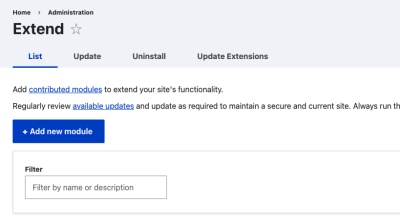
5. Enable “Automatic Updates” and “Automatic Updates Extension” module.
6. Once done, you will see two new tabs on the module listing page “Update” and “Update Extension” or you can navigate using the following “/admin/modules/update” or “/admin/modules/automatic-update-extensions”.