

How to Generate Audit Report for your Drupal 10 Site with no coding experience
Are you looking to audit your Drupal website but feeling overwhelmed by the process? Fear not! We will break down the essential steps for auditing your Drupal 10 site, even if you have minimal experience.
From identifying outdated modules and security vulnerabilities to assessing performance and optimising content.
We will cover the following reports here which you can achieve with minimal steps using static code analysis :
- Best Practices - Is your site following the Drupal best practices and where can you improve them with recommendations.
- Block Caching - Is your blocks getting cached properly or are there optimisations that can be made.
- Cache - Is your cache configuration set correctly
- Codebase - Is your codebase following the correct conventions and the size of the site.
- Content - Check if you are using the content types you are creating and highlight any unused content on the site.
- Cron - Check if the cron is working as expected.
- Database - Check if the database is using the correct collation, engine, size and row count for optimal performance
- Modules - Check if you have any development modules enabled, unused module on the site or is there any duplicate or missing module.
- Insights - Check the site performance using Google Page speed.
- Security - Check if the site is adhering to the drupal securtiy standards and are there any leaks in the system.
- Status - Check the drupal's inbuilt status report for any errors
- Users - The list of roles, blocked and active users.
- Views - Check if the views are cached efficiently
- Watchdog - Check if you have any errors or warnings generated that needs to be addressed.
Steps to Generate Audit Report
- Install the Site Audit Drupal module via "composer require drupal/site_audit:^4.0@RC" or from https://www.drupal.org/project/site_audit On your existing website.
- Go to Extend and enable the following modules
- Site Audit
- Site Audit Report Entity
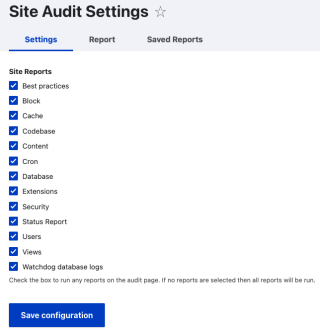
- Once the modules are enabled, you have a option to choose which reports are important to you. You can choose from the predefined list by navigating to "admin/reports/site-audit/settings"
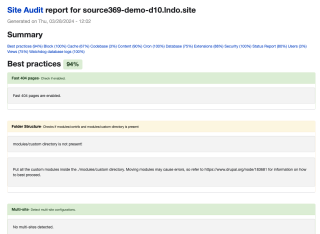
- Now, the part where you can see the actual report. You can either generate report via drush command or you can view it from the Drupal UI. Navigate to "/admin/reports/site-audit" and you can see the audit report.
Check out our YouTube video for a live demonstration! [Watch now]
This Report will give you a high level overview of what is the current state of your website, what can be optimised and some relevant suggestions following the Drupal best practices that can be followed to achieve the best results. This is not the end but a necessary first step on the path of site improvements.