

How to Upgrade your site from Drupal 9/10 to Drupal 11
Drupal is on an exciting Journey of upgrades getting the best of possibilities out there and leading with example. Since, Drupal 10 we are seeing new possibility and ease of use for everyone from Developers to content editors and someone just trying to built something without any prior experience of building an application.
Drupal 11 is no different and a leap forward on the part, getting all the exciting features for :
- Seamless content editing & automatic formatting
- New navigation menu
- Dependent content publishing workflows
- Experience builder
- Improved performance, security and SEO capabilities.
There is also a lot for developers from :
- SDC (Single Directory Component)
- Drupal recipes
- Flexible access policies for granular control over permissions
- PHP & symphony upgrades
- Improved decoupled support.
Platform Requirements for Drupal 11
- Web Server
- Apache 2.4.7 or higher
- Nginx 1.1 or higher
- Database
- MySQL 8.0 or higher
- MariaDB 10.6 or higher
- Percona Server 8.0 or higher
- PostgreSQL 16 or higher
- SQLite 3.45 or higher
- PHP
- PHP 8.3
- Memory
- Disk Space : Min. 100MB
- RAM :Min. 1GB
- PHP Memory: Min. 64MB
- Composer
- Composer 2.3.6 or higher
- Drush
- drush 13
1. Upgrade to Latest Drupal 10
Application or website running on Drupal 10.2.x or earlier version must first upgrade to 10.3.0 or later before upgrading to Drupal 11. As all the core updates added prior to 10.3.0 have been removed. Also, if you are using a Core module or theme that is deprecated or removed from core, you may have to directly use the respective contributed project instead.
2. Enable Upgrade Status Core Module
Next step is to find out which of the modules or themes are compatible with the version you are using and which one needs an update to be compatible with Drupal 11. For this to happen :
- Enable "Upgrade Status" from Extend page.
- Visit the Path "/admin/reports/upgrade-status"
This will show you the current compatibility status of your website's module/themes and issues to fix for compatibility. This report is divided into different sections to tell you the exact next steps you need to do in order to make it compatible and is divided into the following categories :
- Drupal Core & Hosting Environment configuration - this checks and suggest if you are missing any required configuration
- Scan - where you need to select and rescan to check its compatibility & issues
- Collaborate with Maintainers - this would mean the module/theme does not have a compatible version yet and you need to look for patches or collaborate with maintainers to make it compatible.
- Fix Manually - this is for you custom module/theme that needs to be fixed manually through code updates.
Compatible with next major Drupal core version - this says the following modules are compatible and no updates are required for these.
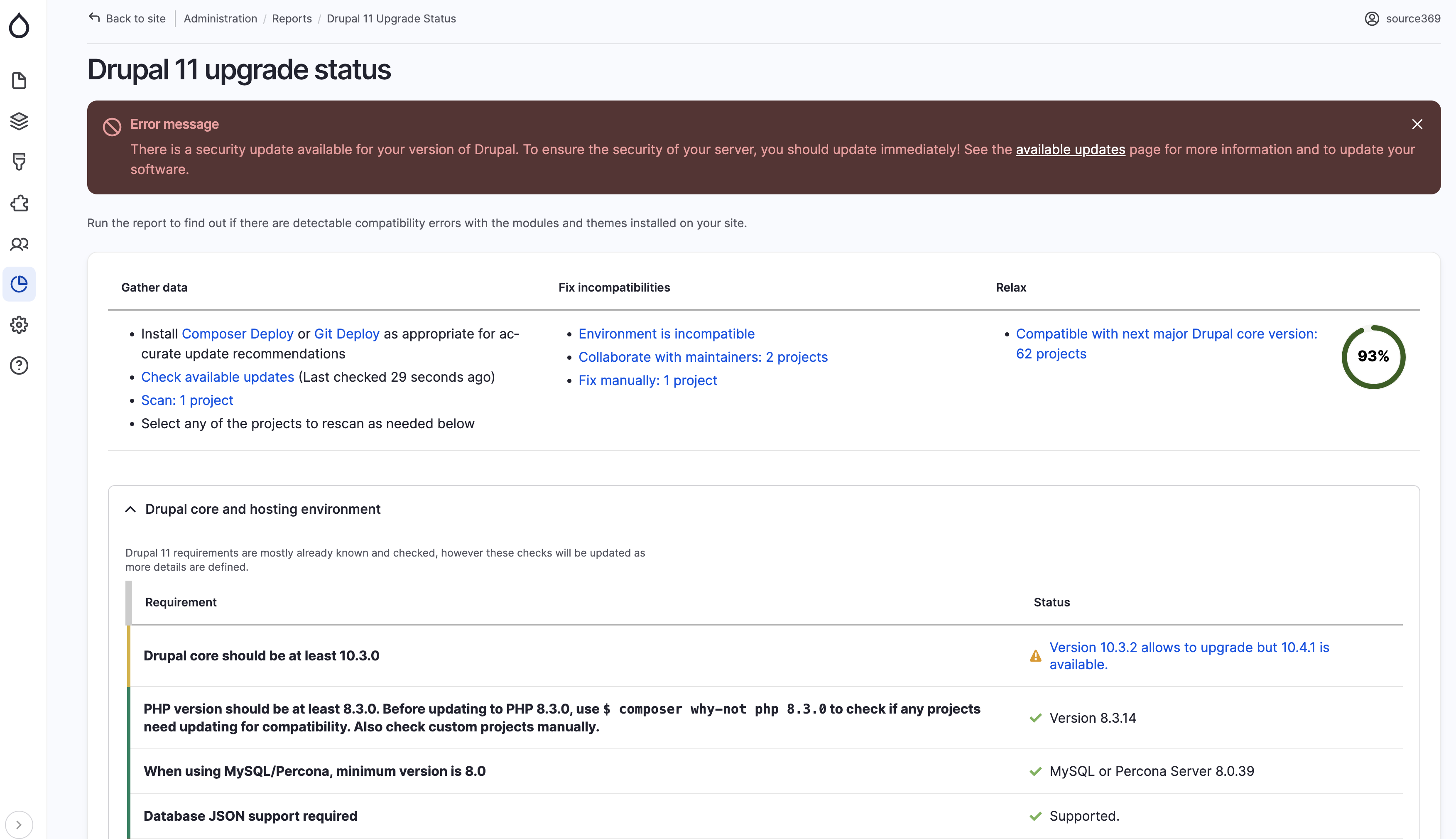
3. Fix Issues based on the Upgrade Status Report
- Fix Hosting requirement issues by updating as per Drupal 11 requirements.
- Upgrade Contributed Modules :
- Check if a compatible version is present on the module or theme project page on drupal.org. If yes, update the module using composer as
composer require drupal/package_name:^x.y - If not, look into module/project issue queue for a patch to make it compatible. If a patch is present use Drupal Lenient and Composer patches Composer plugin to apply the patch as Composer will not read version constraints which are only patched locally.
- Install Composer patches plugin using :
composer require cweagans/composer-patches - Install Drupal Lenient plugin using :
composer require mglaman/composer-drupal-lenient
- Install Composer patches plugin using :
If not, coordinate with project maintainers and help community to make it compatible.
- Check if a compatible version is present on the module or theme project page on drupal.org. If yes, update the module using composer as
- Update Custom Modules :
- Check the deprecation issues and fix the custom code by making it compatible.
- You can use Drupal Rector, this will help fix some of the deprecations.
- Install Drupal Rector as per the steps outlined here : https://github.com/palantirnet/drupal-rector
- Preview the changes drupal rector will make by passing the module path and dry-run parameter as :
vendor/bin/rector process docroot/modules/custom --dry-run - Once you are comfortable with the changes you can make them permanently by removing the dry-run flag from the above command as :
vendor/bin/rector process docroot/modules/custom Re-run upgrade status on the following module to check if all issues are fixed and are good to go.
- Upgrade Drupal Core to Drupal 11
- Once you can see 100% compatibility on upgrade status report, you are good to go to upgrade the drupal core.
- Use the following command to update Drupal core and along with its dependency :
composer update "drupal/core-*" drush/drush --with-all-dependencies Once the core is updated make sure to run any pending database updates using Drush as :
drush updatedb
- Now, its time to remove module or tools we used with the upgrade process using the following :
drush pm-uninstall upgrade_status -yrm rector.phpcomposer remove palantirnet/drupal-rector
Conclusion
Drupal is on a roll, its a good start if you would want to explore and get onboard with the new features and technologies drupal 11 is offering. Though Drupal 11 is great in a lot of areas. Drupal 9 & 10 are still not at the end of lifecycle and you can continue using it. If you want to get on with all the benefits Drupal has to offer its time for a Drupal 11 upgrade. For any queries on the Upgrade process and support we are within reach & eagerly waiting to be your ally in your Drupal journey.